

Administration
API Access
Updated: November 16, 2026
Automate your distributor operations with OAuth client credentials and the Distributor API.
The Distributor API lets you do everything the portal does — list MSPs, read usage, manage users — programmatically. Access is managed under Settings → API Access.
How authentication works
Programmatic clients use the OAuth 2.0 client credentials grant:
- Create a client to get a Client ID and Client Secret.
- Exchange them at the token endpoint for a short-lived bearer token.
- Call the API with the token in the
Authorizationheader.
# 1. Get a token (JSON body)
curl -s https://<api-host>/oauth/token \
  -H 'Content-Type: application/json' \
  -d '{"grant_type": "client_credentials", "client_id": "ftdist_xxxxxxxxxxxx", "client_secret": "'$CLIENT_SECRET'"}'
# → {"access_token": "...", "token_type": "Bearer", "expires_in": 900}

# 2. Call the API
curl -s https://<api-host>/me \
  -H "Authorization: Bearer $TOKEN"
Tokens are valid for 15 minutes (expires_in: 900) — request a fresh one when it expires.
Billing and client reports
# Billable license usage for the current month (UTC), across all your MSPs — needs billing:get
curl -s https://<api-host>/distributors/<distributor-uuid>/licensing \
  -H "Authorization: Bearer $TOKEN"
# → {"periodStart": "2026-03-01T00:00:00.000Z", "periodEnd": "2026-03-17T12:00:00.000Z",
#    "totalLicenseUsage": 120, "totalEmployees": 98, "totalDevices": 61, "billableClientCount": 7,
#    "nfrLicenseUsage": 0, "nfrClientCount": 0,
#    "clients": [{"clientUuid": "...", "clientName": "Acme", "mspUuid": "...", "mspName": "MSP One",
#                 "isNFR": false, "billable": true, "activeUsers": 40, "activeDevices": 12, "licenseUsage": 40}, ...],
#    "mspBreakdown": [{"mspUuid": "...", "mspName": "MSP One", "clientCount": 3,
#                      "activeUsers": 52, "activeDevices": 30, "licenseUsage": 64}, ...]}

# Restrict to some of your MSPs (comma-separated)
curl -s 'https://<api-host>/distributors/<distributor-uuid>/licensing?msp_uuids=<msp-uuid>,<msp-uuid>' \
  -H "Authorization: Bearer $TOKEN"

# The whole of last month (UTC), for example for invoicing MSPs
curl -s 'https://<api-host>/distributors/<distributor-uuid>/licensing?period=previous_month' \
  -H "Authorization: Bearer $TOKEN"
# → {"periodStart": "2026-02-01T00:00:00.000Z", "periodEnd": "2026-02-28T23:59:59.999Z", ...}

# Each MSP's NFR client — needs msp:list
curl -s 'https://<api-host>/distributors/<distributor-uuid>/clients?is_nfr=true' \
  -H "Authorization: Bearer $TOKEN"
# → {"clients": [{"uuid": "...", "name": "MSP One NFR", "mspUuid": "...", "mspName": "MSP One", "isNFR": true,
#                 "status": "active", "planUuid": "...", "products": ["AI"], "mspAccessRole": "100",
# "dateCreated": 1767225600000000}, ...]}/licensingcounts each client asmax(activeUsers, activeDevices)and sums that over billable clients — the same calculation as the License Usage (This Month) card on the Usage page. NFR clients are left out; addinclude_nfr=trueto list them too (they are reported innfrLicenseUsage/nfrClientCountand never count as billable).periodselects the month, in UTC:current_month(the default) runs from 00:00 UTC on the 1st up to now, andprevious_monthis the whole of last month, from 00:00 UTC on its 1st to 23:59:59.999 UTC on its last day.periodStart/periodEndreport the exact range. Only clients that still exist are listed, so a client deleted since the end of last month is not included inprevious_month./licensingis controlled by thebilling:getpermission alone and always covers every MSP of the distributor and every active client of those MSPs: group scoping is not applied, and clients that deny their MSP data access are still counted.msp_uuidscan only narrow it to some of your MSPs.billing:getis granted to the built-in Admin role only (not Read Only); add it to a custom role to give it to other users or API clients./clientslists client organisations across your MSPs. Filter withmsp_uuid(one MSP),query(name search) andis_nfr(true= only NFR clients,false= exclude them, omit for all). It returns identity and plan details only — no client users or admin contacts. It respects group scoping: a user only sees the MSPs in their groups, and an MSP outside your scope returns404.
Creating a client
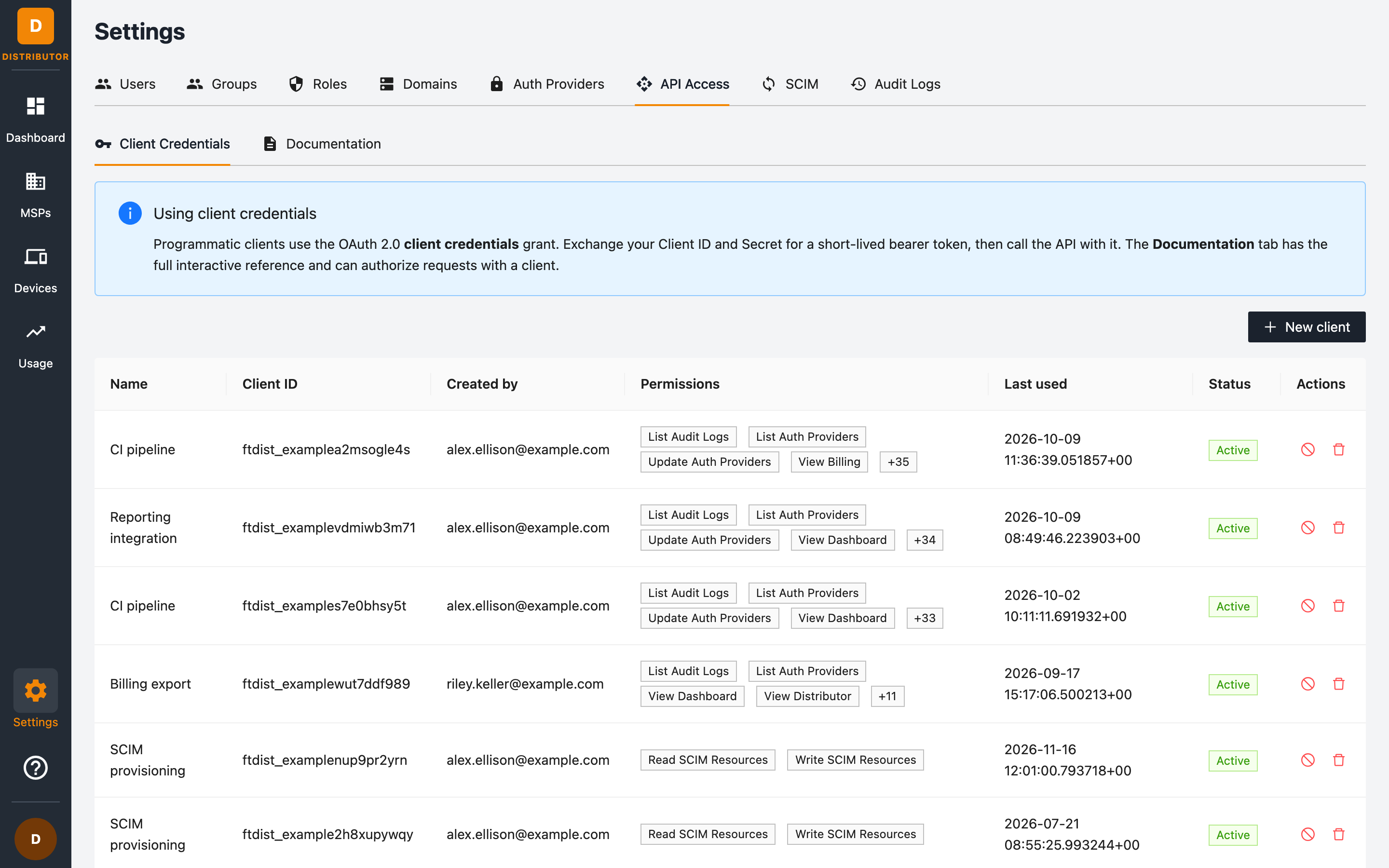
- Go to Settings → API Access → Client Credentials.
- Click + New client.
- In the Create Programmatic Client dialog, name the client (for example CI pipeline) and select its permissions: the same 43 fine-grained permissions used for roles, with Admin (All), Read Only and Clear shortcuts.
- Save, and copy the Client Secret immediately — it is shown only once.
Least privilege: grant clients only the permissions they need. A reporting integration typically needs just
dashboard:getandmsp:list(plusbilling:getfor/licensing).
Managing clients
The client table shows each client's Name, Client ID (prefixed ftdist_), who created it, its permissions, when it was last used, and its status (Active or Revoked). From the Actions column you can:
- Revoke (the stop icon) — stop the client from getting new tokens. A revoked client stays in the list, marked Revoked.
- Delete — remove the client.
Interactive API reference
The Documentation sub-tab embeds the full interactive OpenAPI reference for the Distributor API:
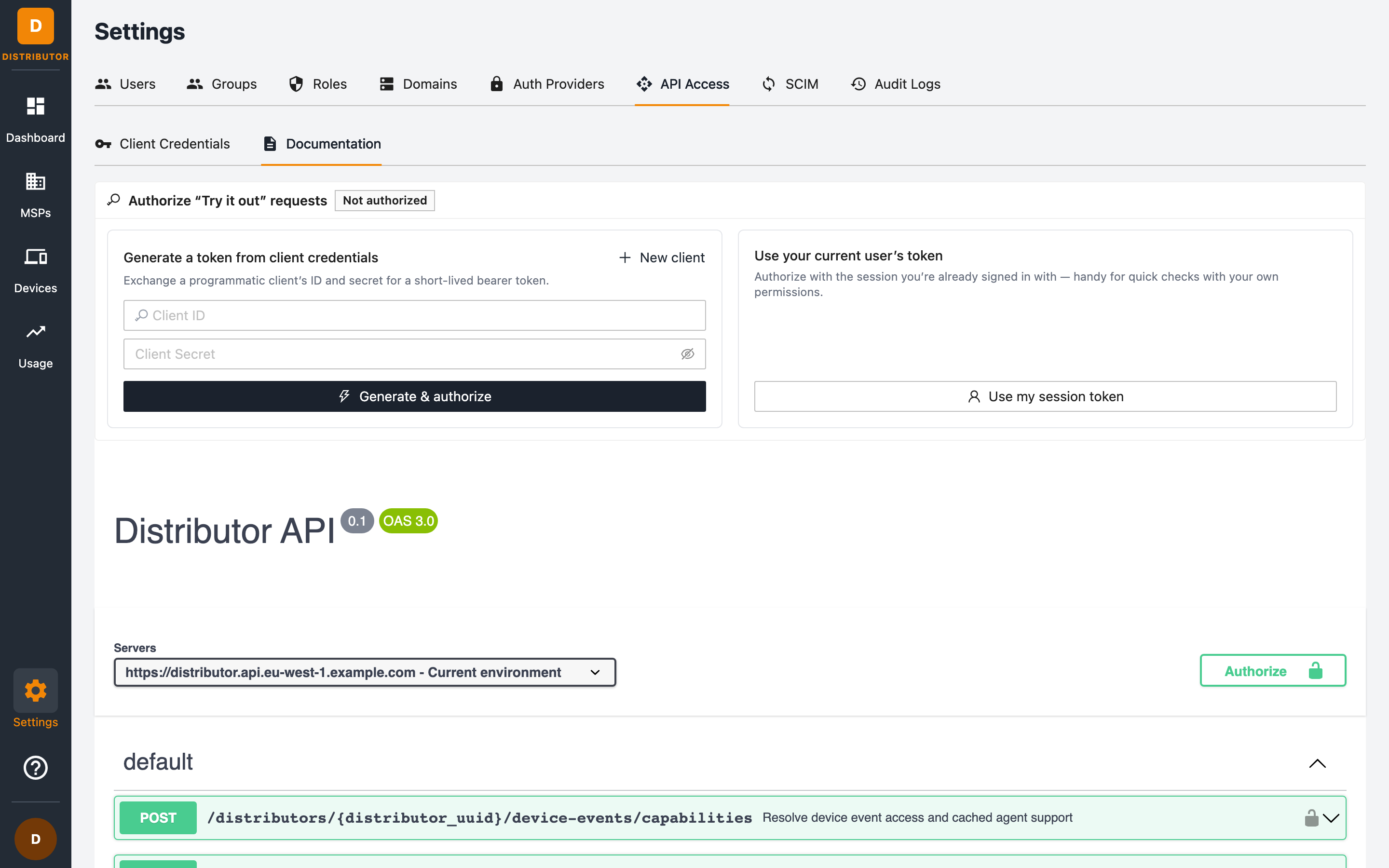
- Paste a Client ID and Client Secret and click Authorize to try requests against your real distributorship, or click Use my session token to reuse your current portal session.
- Endpoints cover health checks,
GET /me(your resolved user and permissions), distributor management, MSPs, usage, users, roles, groups, and more.
Related permissions
Managing API clients requires the programmatic_client:create, programmatic_client:list, and programmatic_client:delete permissions.