

Monitoring
Usage
Updated: November 16, 2026
License usage, AI activity and guardrails across your MSPs and clients, plus monthly client reports.
The Usage page breaks consumption down by MSP and by client. It has two tabs: Overview and Monthly Reports.
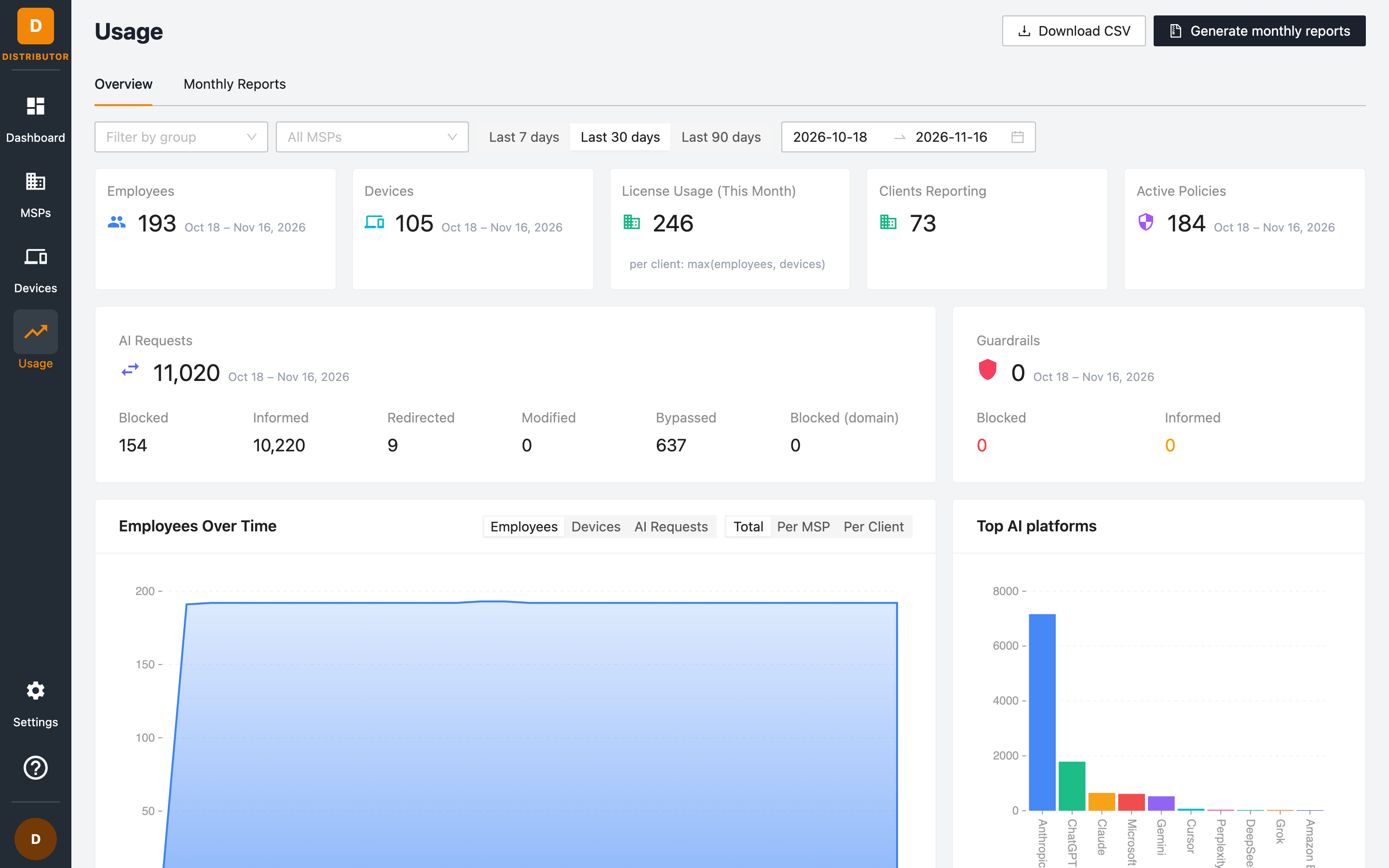
Filters
| Control | Effect |
|---|---|
| Filter by group | Restrict the view to MSPs in a group. |
| All MSPs | Focus on one or more MSPs. |
| Last 7 days / Last 30 days / Last 90 days | Quick date ranges. |
| Date range | Pick the start and end dates for every card and chart. |
Click Download CSV to export the usage for the current filters, for example for invoicing MSPs. For automated reporting, use the Distributor API instead.
Summary cards
| Card | Meaning |
|---|---|
| Employees | Unique employees observed across the selected MSPs' clients. |
| Devices | Unique devices reporting in the period. |
| License Usage (This Month) | The billable figure for the current month: for each client, the larger of its employees and devices (max(employees, devices)), summed over billable clients. |
| Clients Reporting | Client workspaces that sent data. |
| Active Policies | Policies in force across the client base during the period. |
| AI Requests | AI requests in the period, broken down into Blocked, Informed, Redirected, Modified, Bypassed and Blocked (domain). |
| Guardrails | Requests that triggered a guardrail, split into Blocked and Informed. |
Charts
The Employees Over Time chart shows trends across the selected period. Two segmented controls change what it plots:
- Metric — Employees, Devices or AI Requests.
- Grouping — the Total, or one series Per MSP or Per Client.
Top AI platforms shows the AI platforms with the most requests.
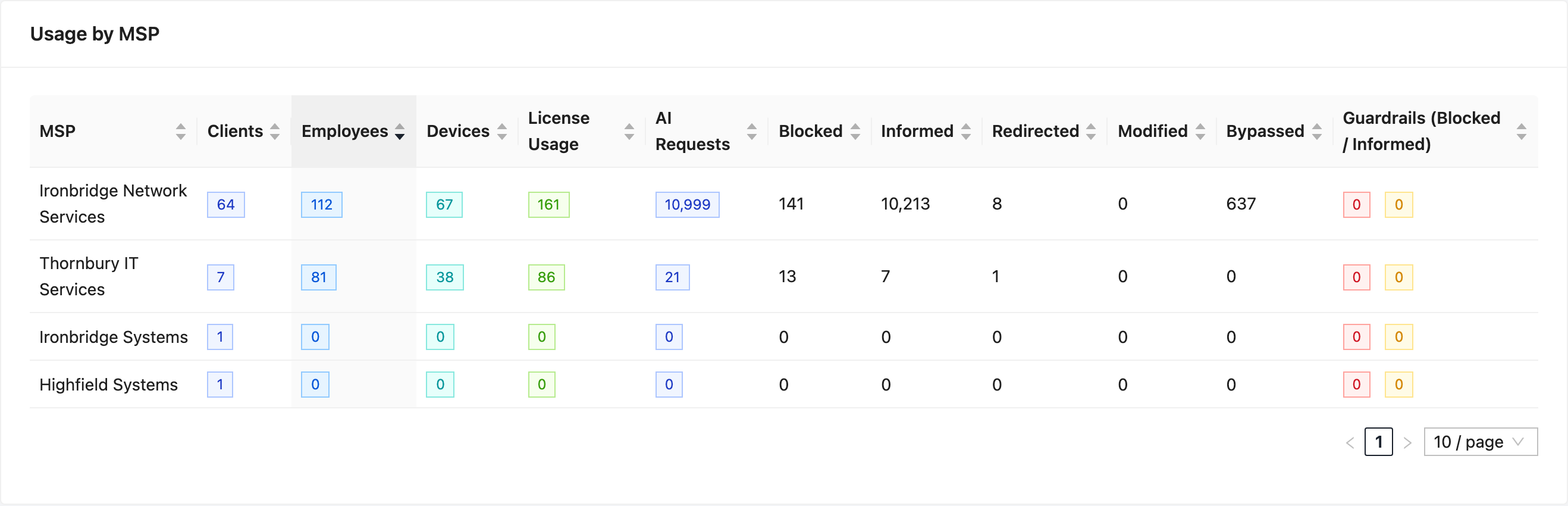
Usage by MSP
A sortable table with one row per MSP: Clients, Employees, Devices, License Usage, AI Requests, the request counts per action, and Guardrails (Blocked / Informed). Use it to see at a glance which MSPs consume the most licenses.
Usage by Client
The same breakdown at the client level, including the MSP each client belongs to.
NFR clients (Not For Resale, for example an MSP's own internal workspace) are marked in the table and excluded from license usage totals.
Guardrail activity
Below the tables, Guardrail activity lists the guardrails your clients use, how many requests each evaluated and how often it blocked or informed, with charts by client and by platform. It has its own Download CSV button.
Monthly Reports
The Monthly Reports tab lists the client reports generated for your MSPs. These are the same reports each MSP sees in its own portal.
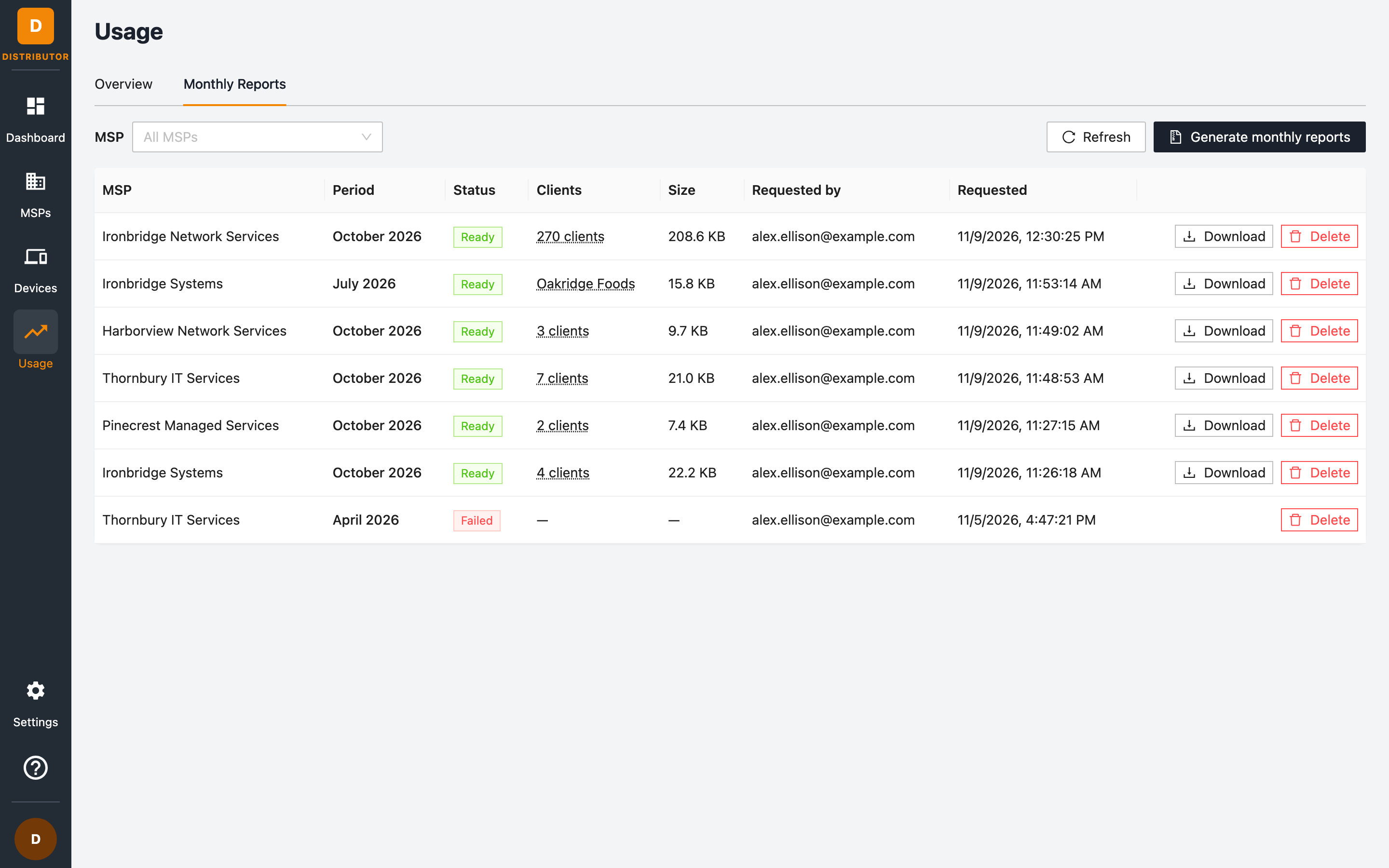
| Column | Meaning |
|---|---|
| MSP | The MSP the report covers. Filter the list with the MSP selector. |
| Period | The calendar month covered. |
| Status | Ready, or Failed if generation did not complete. |
| Clients | How many clients the report includes (a single client's name when only one). |
| Size | The size of the download. |
| Requested by / Requested | Who generated it, and when. |
Use Download to get a report and Delete to remove it. Click Refresh to update the list while reports are being generated.
Generating monthly reports
- Click Generate monthly reports (on either tab).
- Select the MSP and the Month. Reports always cover a completed calendar month, in UTC.
- Optionally pick Clients. Leave it empty to include every client the MSP can view that existed by the end of the month; not-for-resale clients are only included when selected explicitly.
- Click Generate.
Each report contains one CSV per client, a summary CSV and a prompt for turning a CSV into a customer-facing report. Generated reports stay available to download for 12 months.
Generating reports needs the report:generate permission; listing and downloading need report:list and report:get, and deleting needs report:delete.
From the API
GET /distributors/<distributor-uuid>/licensing returns the license usage figure (totalLicenseUsage; add period=previous_month for the whole of last month), with per-client and per-MSP breakdowns. See API Access. It needs the billing:get permission and always covers all of your MSPs and their clients, whatever the caller's group scope, so it can be higher than the card a group-scoped user sees. The API calculates the month in UTC, so for the first hours of a month it can differ from the card, which uses your browser's local time.